
Recharge
Use the Recharge connector to sync subscription, charge, customer, and related commerce data into your Athena lakehouse. Blotout runs the Airbyte Recharge connector inside your deployment.
For connector reference (streams, scopes, plan requirements), see the Airbyte Recharge docs.
Prerequisites
Section titled “Prerequisites”- A tag with Blotout Cloud set up (green checkmark in the Tags table)
- A Recharge account with permission to access the data you want to sync
- A Recharge API Access Token with the required read scopes for those streams
- A Recharge plan that supports the streams you need (some streams require Pro or Custom)
Generate an Access Token
Section titled “Generate an Access Token”- Follow the Recharge API Key guide to create an API Access Token.
- Grant read scopes for every stream you plan to sync. Missing scopes cause
403authorization errors. See the Airbyte scopes table for the full list (for example,read_customers,read_orders,read_subscriptions).
Create the pipeline
Section titled “Create the pipeline”Follow the shared Create a pipeline steps until the source catalogue appears, then select Recharge.
Source configuration
Section titled “Source configuration”On the Source step, configure the connector:
| Field | Purpose |
|---|---|
| Schedule Type | How the pipeline runs — typically Scheduled |
| Sync Frequency | How often Airbyte syncs (for example, Every 24 hours) |
| Source Name | Name for this pipeline — used in the Athena schema <SOURCE_NAME>_<ENV> |
Authentication (Access Token)
Section titled “Authentication (Access Token)”Blotout Cloud authenticates Recharge with an API Access Token:
- Under Recharge Configuration, set Start Date — the earliest datetime to sync from (ISO 8601, for example
2026-01-15T00:00:00Z). Data before this date is not included. - Paste your Recharge API Access Token into the Access Token field.
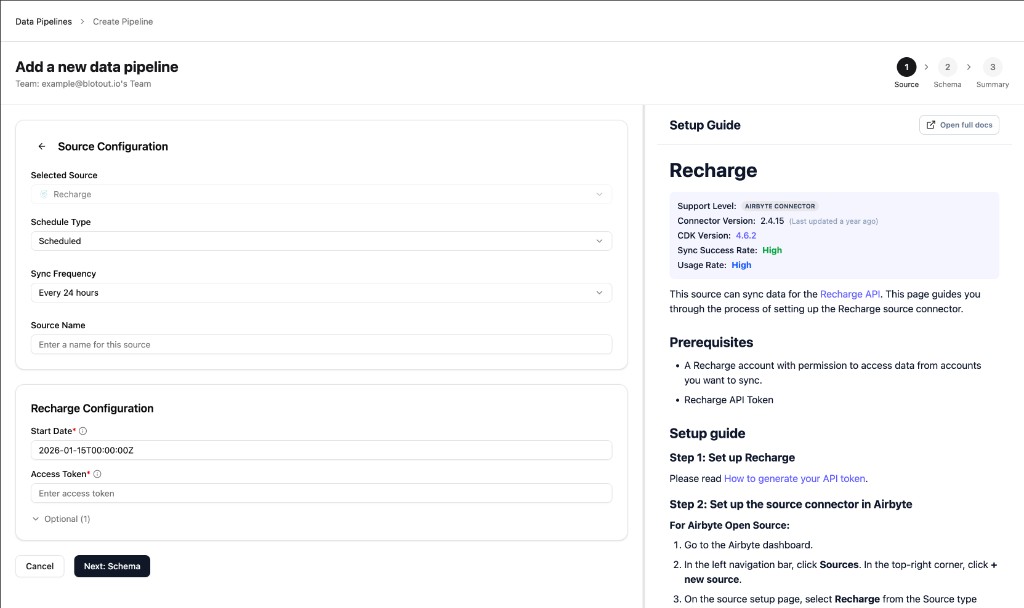
Optional settings (for example, lookback window) can be expanded under Optional if you need to re-fetch recent records on each incremental sync.
Complete Schema and Summary
Section titled “Complete Schema and Summary”Continue through the Schema and Summary steps to choose streams and confirm the connection. Save and run the first sync.
After a successful sync, Airflow creates an organization-scoped DAG for the pipeline.
Related documentation
Section titled “Related documentation”- Data Pipelines overview — Tags-first create flow
- Airflow — DAG schedules and monitoring
- Airbyte Recharge — streams, scopes, and connector reference