
Amazon Seller Partner
Use the Amazon Seller Partner connector to sync orders, inventory, finances, and related Seller/Vendor Central data into your Athena lakehouse. Blotout runs the Airbyte Amazon Seller Partner connector inside your deployment.
For connector reference (streams, regions, Brand Analytics), see the Airbyte Amazon Seller Partner docs.
Prerequisites
Section titled “Prerequisites”- A tag with Blotout Cloud set up (green checkmark in the Tags table)
- An Amazon Seller Partner account
- A published SP-API developer application (Amazon does not allow external tools to access draft apps)
- Open Source / self-hosted credentials:
- AWS Environment (for example, PRODUCTION)
- AWS Region (for example, US)
- AWS Seller Partner Account Type (Seller or Vendor)
- LWA Client Id
- LWA Client Secret
- Refresh Token
Optional advanced access:
- Brand Analytics streams — Brand Registry registration and Brand Analytics role on the SP-API app
- PII in Orders / OrderItems — approved Restricted Role (Direct-to-Consumer Shipping or Tax Invoicing)
Seller accounts need access to the Orders endpoint; Vendor accounts need Vendor Orders access for connection checks to pass.
Create the pipeline
Section titled “Create the pipeline”Follow the shared Create a pipeline steps until the source catalogue appears, then select Amazon Seller Partner.
Source configuration
Section titled “Source configuration”On the Source step, configure the connector:
| Field | Purpose |
|---|---|
| Schedule Type | How the pipeline runs — typically Scheduled |
| Sync Frequency | How often Airbyte syncs (for example, Every 24 hours) |
| Source Name | Name for this pipeline — used in the Athena schema <SOURCE_NAME>_<ENV> |
| AWS Environment | Target environment — typically PRODUCTION |
| AWS Region | Marketplace region (for example, US) |
| AWS Seller Partner Account Type | Seller or Vendor |
| LWA Client Id | Login with Amazon client ID from your published SP-API app |
| LWA Client Secret | Login with Amazon client secret |
| Refresh Token | OAuth refresh token from Amazon authorization |
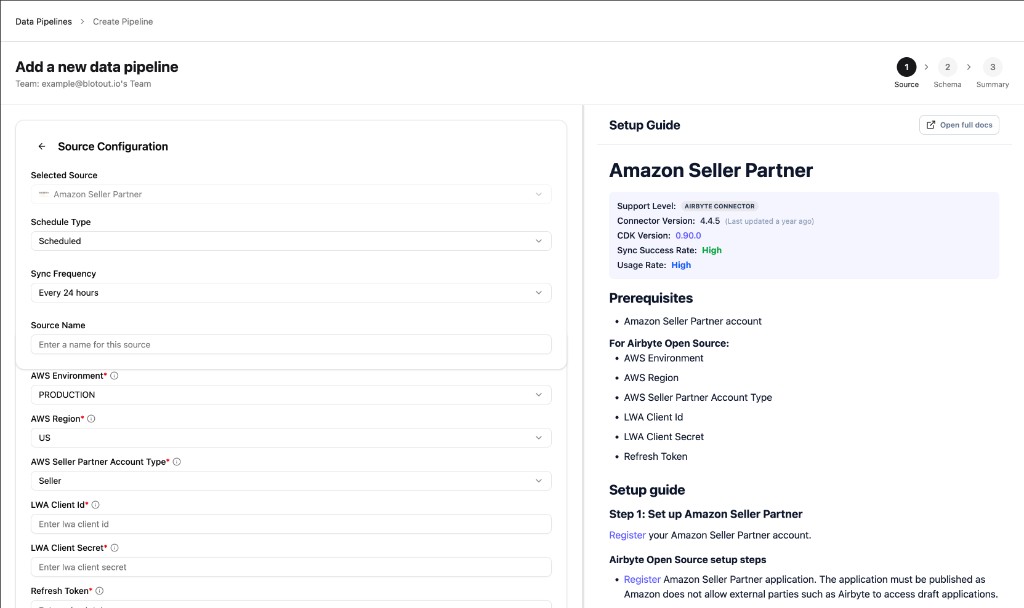
Supported marketplace regions include US, CA, MX, BR, UK/GB, DE, FR, IT, ES, NL, BE, PL, SE, TR, AE, SA, EG, IN, AU, JP, SG, and others listed in the Airbyte supported regions.
Complete Schema and Summary
Section titled “Complete Schema and Summary”Continue through the Schema and Summary steps to choose streams and confirm the connection. Save and run the first sync.
After a successful sync, Airflow creates an organization-scoped DAG for the pipeline.
Related documentation
Section titled “Related documentation”- Data Pipelines overview — Tags-first create flow
- Amazon Ads — advertising data (Sponsored Products / Brands / Display)
- Airbyte Amazon Seller Partner — streams and connector reference