
Shopify
Use the Shopify connector to sync orders, products, customers, and related commerce data into your Athena lakehouse. Blotout runs the Airbyte Shopify connector inside your deployment.
For connector reference (streams, scopes, changelog), see the Airbyte Shopify docs.
Prerequisites
Section titled “Prerequisites”- A tag with Blotout Cloud set up (green checkmark in the Tags table)
- An active Shopify store
- If you do not own the store, request access from the store owner
- A Shopify custom app with Admin API
read_scopes enabled, and its Admin API access token (used as the API Password)
Create a Shopify custom app
Section titled “Create a Shopify custom app”- Log in to your Shopify admin.
- Go to Settings → Apps and sales channels → Develop apps → Create an app.
- Name the app, then open Configure Admin API scopes.
- Enable the required
read_scopes only (do not enablewrite_scopes). See the Airbyte Shopify scope list for the full set. - Click Install app, then open API credentials and copy the Admin API access token.
Create the pipeline
Section titled “Create the pipeline”Follow the shared Create a pipeline steps until the source catalogue appears, then select Shopify.
Source configuration
Section titled “Source configuration”On the Source step, configure the connector:
| Field | Purpose |
|---|---|
| Schedule Type | How the pipeline runs — typically Scheduled |
| Sync Frequency | How often Airbyte syncs (for example, Every 24 hours) |
| Source Name | Name for this pipeline — used in the Athena schema <SOURCE_NAME>_<ENV> |
Authentication (API Password)
Section titled “Authentication (API Password)”Blotout Cloud uses API Password authentication for Shopify (Admin API access token from a custom app):
- Under Shopify Configuration, enter your Shopify Store name — the subdomain from your admin URL (for example,
my-storeforhttps://my-store.myshopify.com), also available under Settings → Store details. - Set Shopify Authorization Method to API Password.
- Paste the custom app Admin API access token into the API Password field.
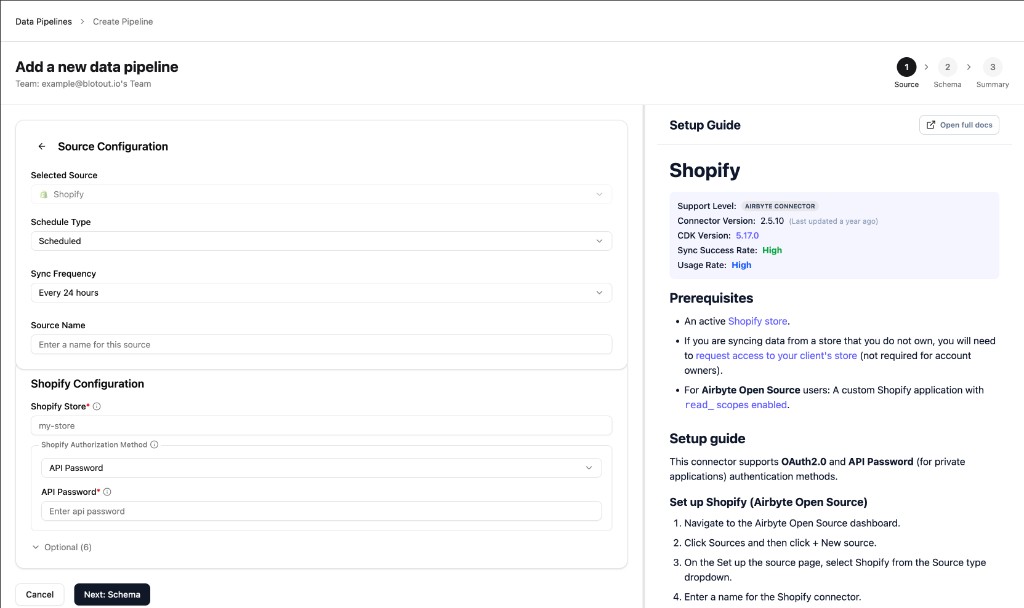
Optional fields (for example, replication start date) can be expanded under Optional if you need to limit how far back historical data is synced.
Complete Schema and Summary
Section titled “Complete Schema and Summary”Continue through the Schema and Summary steps to choose streams and confirm the connection. Save and run the first sync.
After a successful sync, Airflow creates an organization-scoped DAG for the pipeline, and dbt models feed the Shopify Dashboard.
Related documentation
Section titled “Related documentation”- Data Pipelines overview — Tags-first create flow
- Shopify Dashboard — analytics built on this pipeline
- Airbyte Shopify — streams, scopes, and connector reference