
Facebook Marketing
Use the Facebook Marketing connector to sync Meta Ads campaign, creative, and insights data into your Athena lakehouse. Blotout runs the Airbyte Facebook Marketing connector inside your deployment.
For connector reference (streams, rate limits, changelog), see the Airbyte Facebook Marketing docs.
Prerequisites
Section titled “Prerequisites”- A tag with Blotout Cloud set up (green checkmark in the Tags table)
- A Facebook Ad Account ID — find it in Meta Ads Manager (Account dropdown or the browser address bar)
- Access to the Ad Account — if you are not the owner or admin, an admin must grant you permission
- Recommended permissions for Marketing API access:
ads_management,ads_read,business_management, andread_insights
Create the pipeline
Section titled “Create the pipeline”Follow the shared Create a pipeline steps until the source catalogue appears, then select Facebook Marketing.
Source configuration
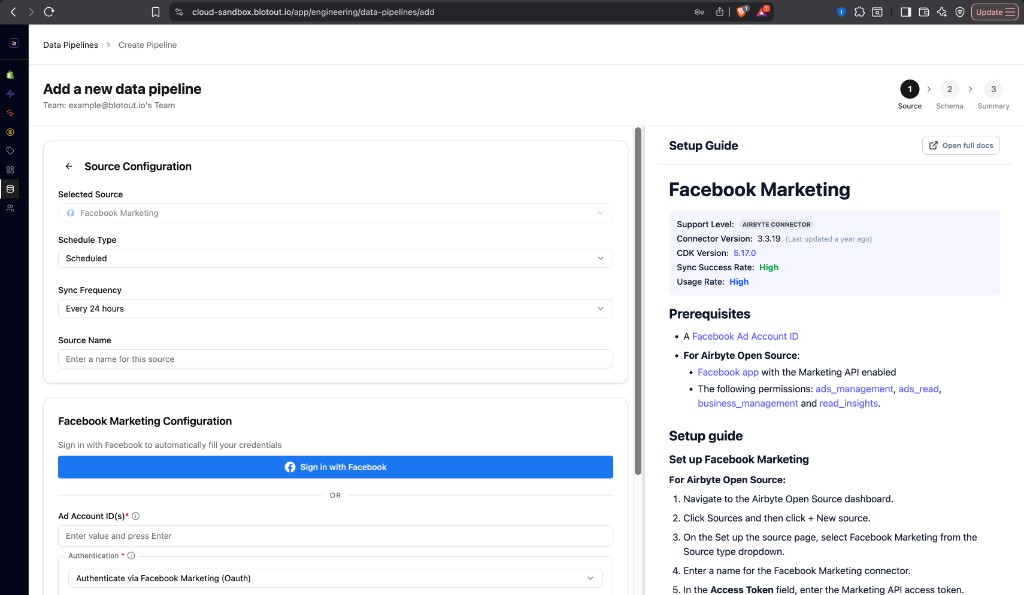
Section titled “Source configuration”On the Source step, configure the connector:
| Field | Purpose |
|---|---|
| Schedule Type | How the pipeline runs — typically Scheduled |
| Sync Frequency | How often Airbyte syncs (for example, Every 24 hours) |
| Source Name | Name for this pipeline — used in the Athena schema <SOURCE_NAME>_<ENV> |
Authentication (OAuth)
Section titled “Authentication (OAuth)”Blotout Cloud authenticates Facebook Marketing with OAuth. Prefer automatic sign-in:
- Under Facebook Marketing Configuration, click Sign in with Facebook.
- Log in with the Facebook account that has access to the Ad Account you want to sync. Airbyte authenticates the account you are currently logged in to.
- Approve the requested Marketing API permissions when Facebook prompts you.
- Enter your Ad Account ID(s) — one or more IDs; press Enter after each value.
- Confirm Authentication is set to Authenticate via Facebook Marketing (Oauth).
Complete Schema and Summary
Section titled “Complete Schema and Summary”Continue through the Schema and Summary steps to choose streams and confirm the connection. Save and run the first sync.
After a successful sync, Airflow creates an organization-scoped DAG for the pipeline, and dbt models feed the Facebook Dashboard.
Related documentation
Section titled “Related documentation”- Data Pipelines overview — Tags-first create flow
- Facebook Dashboard — analytics built on this pipeline
- Airbyte Facebook Marketing — streams and connector reference