
Data Pipelines
Data pipelines ingest data from external sources — Shopify, Facebook Marketing, Google Ads, TikTok, Klaviyo, and others — into your Athena data lake. Pipelines are scoped to a tag and managed through Airbyte, which runs inside your Blotout Cloud deployment and is orchestrated by Airflow.
Create a pipeline
Section titled “Create a pipeline”Pipelines are created from a tag, not from the Data Pipelines page directly. Each pipeline is scoped to the tag you select.
- Go to Blotout Cloud and select your Team from the top bar.
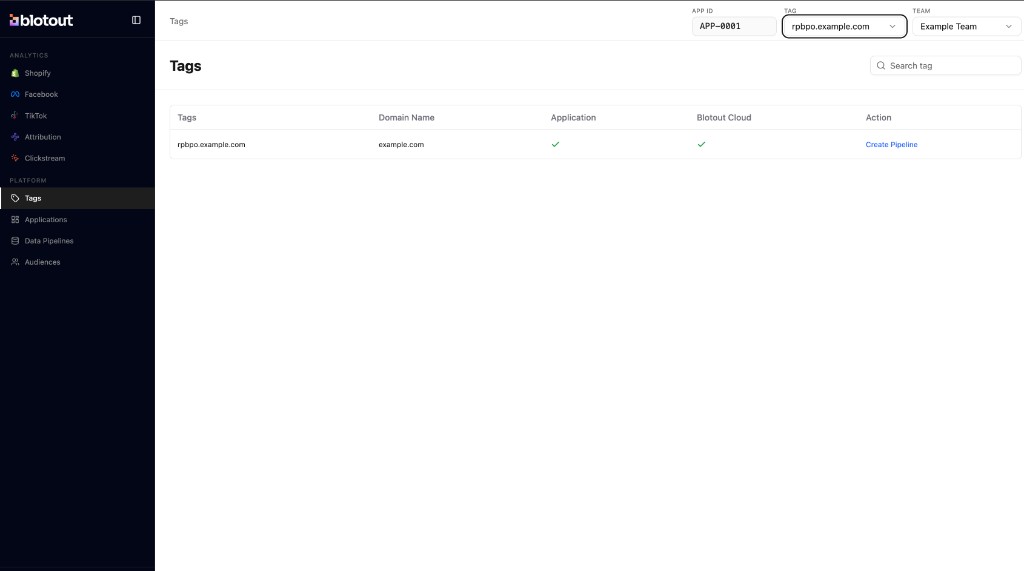
- Open Tags from the left sidebar under Platform.
- Find the tag you want to connect a source to. Use the search box to filter by tag name if needed. Confirm the Blotout Cloud column shows a checkmark for that tag.
- In the Action column, click Create Pipeline for that tag row.
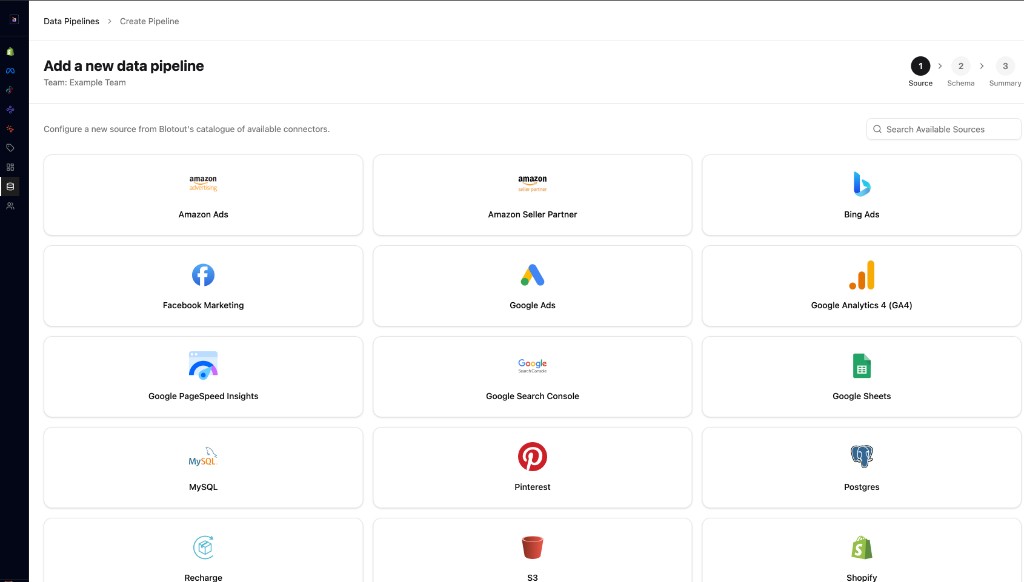
- On the Add a new data pipeline screen, choose a source connector from the catalogue (for example, Facebook Marketing, Shopify, Google Ads, Recharge, or TikTok Marketing). Use Search Available Sources to filter the list.
- Complete the remaining steps — Schema and Summary — and enter the credentials required by the connector (API tokens, account IDs, or OAuth depending on the source).
- Configure the sync schedule and destination schema. Blotout creates an Athena schema following the naming convention
<SOURCE_NAME>_<ENV>documented in Data Storage Standards. - Save and run the first sync.
Once the pipeline is active, Airflow creates an organization-scoped DAG (for example, acme_shopify) that runs on the configured schedule.
What happens after connection
Section titled “What happens after connection”| Step | System | Result |
|---|---|---|
| 1 | Airbyte | Syncs raw source data into S3 |
| 2 | Airflow DAG | Triggers on schedule |
| 3 | dbt models | Transform source data into analytics-ready tables |
| 4 | Dashboards | Dashboard DAGs refresh reporting models |
Supported sources
Section titled “Supported sources”| Source | Setup guide |
|---|---|
| Facebook Marketing | Sync Meta Ads campaigns, creatives, and insights via OAuth |
| Shopify | Sync orders, products, and customers via API Password |
| Google Ads | Sync campaign and performance metrics via OAuth |
| Recharge | Sync subscriptions, charges, and customers via Access Token |
| TikTok Marketing | Sync campaigns, ads, and delivery metrics via OAuth 2.0 |
| Amazon Ads | Sync Sponsored Products, Brands, and Display via Client ID / Secret / Refresh Token |
| Amazon Seller Partner | Sync Seller/Vendor Central orders and catalog via LWA credentials |
| AppLovin | Sync publisher revenue and advertiser campaign performance via API Key |
| CartRush | Sync subscription orders, analytics, and conversion data via API Key |
| Everflow | Sync conversions, clicks, entity reports, and affiliate/offer/advertiser dimensions via Network API Key |
| Tellescope | Sync 91 clinical and operational streams (HIPAA/PHI) via API Key |
| Attentive | Sync segment definitions, catalog uploads, and account metadata via API Key — plus SFTP data feeds for message performance and revenue |
| TikTok Shop | Sync orders, products, returns, finance statements, and 13 more streams via HMAC-signed Partner API |
| ChatGPT Ads | Sync campaigns, ad groups, ads, and daily performance insights via OpenAI Advertiser API Key |
| Prescient AI | Sync modeled (MMM) attribution with halo effects and reported spend via GraphQL API Key |
| Triple Whale Attribution | Sync order-level attribution journeys, pixel-attributed ad performance, and platform-reported ad spend via API Key |
| Klaviyo | Email / CRM data |
| Postgres, MySQL | Database connectors |
Additional connectors can be configured through the Airbyte UI. Contact your Blotout administrator if you need a source that is not listed.
Related documentation
Section titled “Related documentation”- Airflow — DAG schedules and monitoring
- Dashboards — analytics built on pipeline data
- Data Storage Standards — where pipeline data is stored
- Tags — pipelines are scoped to a tag