
Policies
By default any user created in AWS doesn’t have any permissions. We need to create some policies so that we can allow the user to perform certain actions in AWS. We can either choose to attach admin access or create the following policies —
Terraform provisioning (attach to the deploy user):
Runtime IAM-role auth (trust + checklist — permissions are in 1–6):
These first six policies cover Terraform infra → app → sdk (and cdn) end-to-end. Attach all six before running apply, or provisioning will fail mid-run when a later workspace needs DynamoDB, SQS, EKS Access Entries, Firehose logs, Glue notifications, or Bedrock. Data-plane actions used by apps (Athena, SQS messages, DynamoDB items, Firehose, etc.) are included in Policies 1–6. IAM user / access-key APIs are not included (unused by current app paths).
Below steps continue from how to attach policies to a user.
Policy 1: Policy for access related to s3
Section titled “Policy 1: Policy for access related to s3”- Click on JSON to create the policy based on JSON document.
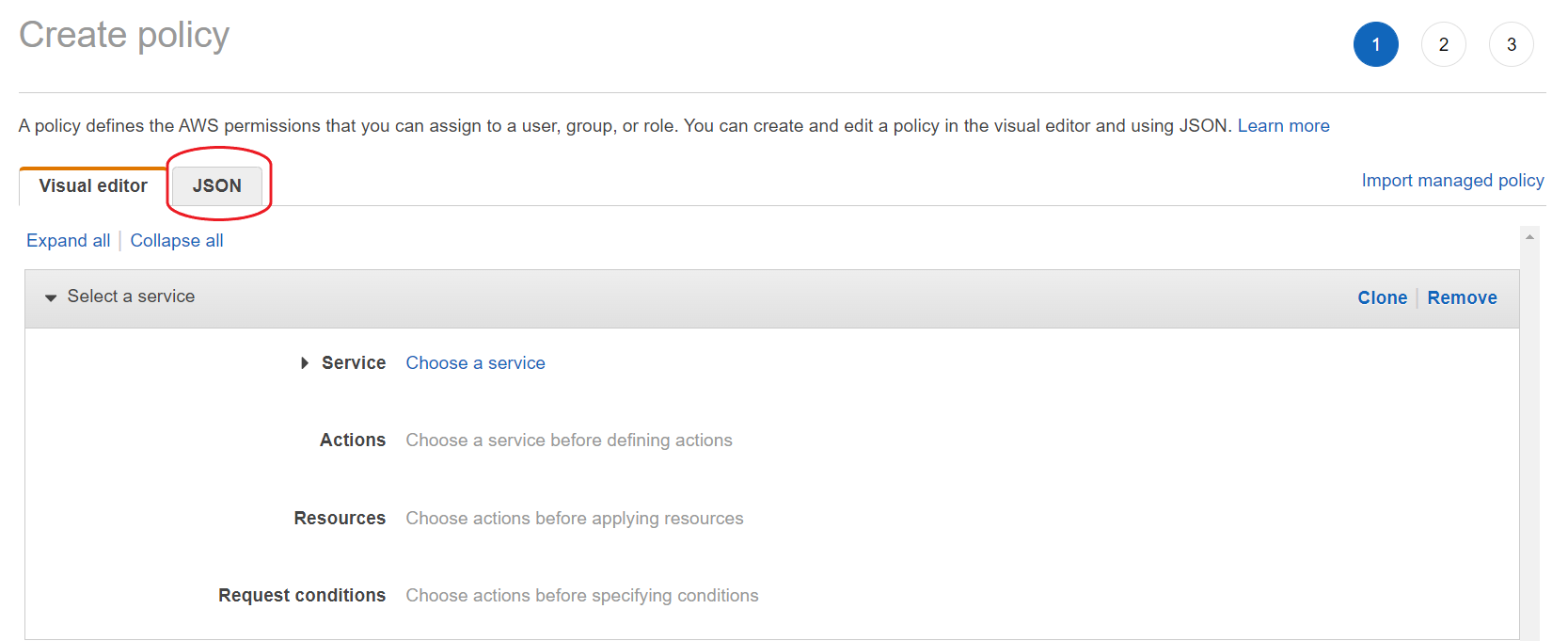
- Paste the following in the text box by replacing its original content.
{"Version": "2012-10-17","Statement": [{"Sid": "SelfServeS3Buckets","Effect": "Allow","Action": ["s3:CreateBucket","s3:DeleteBucket","s3:ListBucket","s3:ListBucketVersions","s3:GetBucketLocation","s3:GetBucketAcl","s3:PutBucketAcl","s3:GetBucketPolicy","s3:PutBucketPolicy","s3:DeleteBucketPolicy","s3:GetBucketPublicAccessBlock","s3:PutBucketPublicAccessBlock","s3:GetBucketOwnershipControls","s3:PutBucketOwnershipControls","s3:GetEncryptionConfiguration","s3:PutEncryptionConfiguration","s3:GetLifecycleConfiguration","s3:PutLifecycleConfiguration","s3:GetBucketWebsite","s3:PutBucketWebsite","s3:DeleteBucketWebsite","s3:GetBucketTagging","s3:PutBucketTagging","s3:GetBucketCORS","s3:GetBucketLogging","s3:GetBucketVersioning","s3:GetAccelerateConfiguration","s3:GetBucketRequestPayment","s3:GetBucketObjectLockConfiguration","s3:GetReplicationConfiguration","s3:GetObject","s3:PutObject","s3:DeleteObject","s3:GetObjectVersion","s3:DeleteObjectVersion","s3:PutObjectAcl","s3:PutObjectTagging","s3:RestoreObject"],"Resource": ["arn:aws:s3:::b-<ORG_NAME>-<ENV_NAME>-landing","arn:aws:s3:::b-<ORG_NAME>-<ENV_NAME>-landing/*","arn:aws:s3:::b-<ORG_NAME>-<ENV_NAME>-stg","arn:aws:s3:::b-<ORG_NAME>-<ENV_NAME>-stg/*","arn:aws:s3:::b-<ORG_NAME>-<ENV_NAME>-processed","arn:aws:s3:::b-<ORG_NAME>-<ENV_NAME>-processed/*","arn:aws:s3:::b-<ORG_NAME>-<ENV_NAME>-outbound","arn:aws:s3:::b-<ORG_NAME>-<ENV_NAME>-outbound/*","arn:aws:s3:::b-<ORG_NAME>-<ENV_NAME>-athena-logs","arn:aws:s3:::b-<ORG_NAME>-<ENV_NAME>-athena-logs/*","arn:aws:s3:::b-<ORG_NAME>-<ENV_NAME>-emr","arn:aws:s3:::b-<ORG_NAME>-<ENV_NAME>-emr/*","arn:aws:s3:::b-<ORG_NAME>-<ENV_NAME>-assets","arn:aws:s3:::b-<ORG_NAME>-<ENV_NAME>-assets/*","arn:aws:s3:::b-<ORG_NAME>-<ENV_NAME>-airbyte-logs","arn:aws:s3:::b-<ORG_NAME>-<ENV_NAME>-airbyte-logs/*","arn:aws:s3:::b-<ORG_NAME>-<ENV_NAME>-airbytev2-logs","arn:aws:s3:::b-<ORG_NAME>-<ENV_NAME>-airbytev2-logs/*","arn:aws:s3:::b-<ORG_NAME>-<ENV_NAME>-athena-mcp-server-logs","arn:aws:s3:::b-<ORG_NAME>-<ENV_NAME>-athena-mcp-server-logs/*"]},{"Sid": "SelfServeS3ListAll","Effect": "Allow","Action": ["s3:ListAllMyBuckets","s3:PutAccountPublicAccessBlock"],"Resource": "*"}]}
- Replace
<ORG_NAME>with the Organization Name and<ENV_NAME>with the Environment name in the above JSON policy document. - Click on Next: Tags and Next: Review. You can add tags if you want.
- Name the policy as
self-serve-s3-policyand use the following image to fill in the details and then click Create Policy.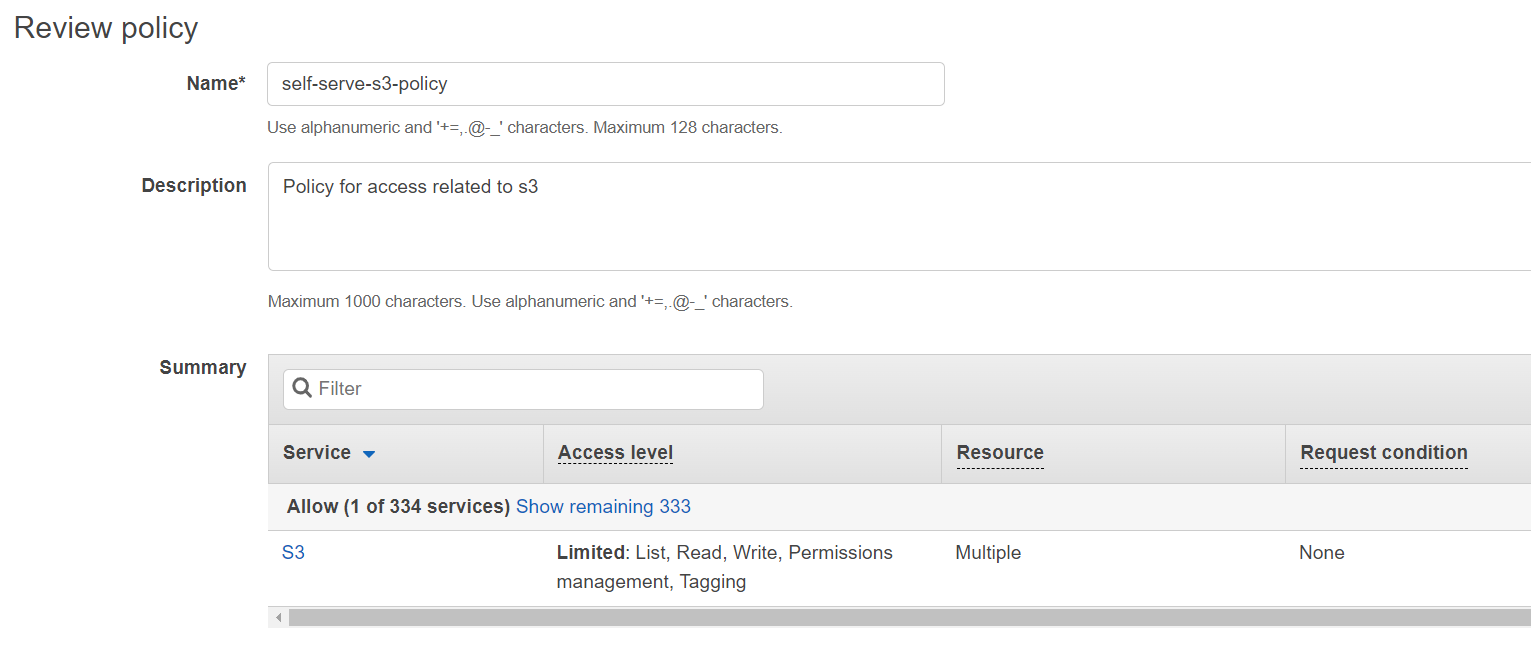
Policy 2: Policy for access related to iam
Section titled “Policy 2: Policy for access related to iam”- Click on IAM from your console and then select Policies.
- Click on Create Policy and then click on JSON to create the policy based on JSON document.
- Paste the following in the text box by replacing its original content.
{"Version": "2012-10-17","Statement": [{"Sid": "SelfServeIamManage","Effect": "Allow","Action": ["iam:CreateRole","iam:DeleteRole","iam:GetRole","iam:GetRolePolicy","iam:PutRolePolicy","iam:DeleteRolePolicy","iam:UpdateAssumeRolePolicy","iam:TagRole","iam:UntagRole","iam:AttachRolePolicy","iam:DetachRolePolicy","iam:ListAttachedRolePolicies","iam:ListRolePolicies","iam:PassRole","iam:CreatePolicy","iam:DeletePolicy","iam:GetPolicy","iam:GetPolicyVersion","iam:ListPolicyVersions","iam:CreatePolicyVersion","iam:DeletePolicyVersion","iam:SetDefaultPolicyVersion","iam:TagPolicy","iam:UntagPolicy","iam:CreateOpenIDConnectProvider","iam:GetOpenIDConnectProvider","iam:DeleteOpenIDConnectProvider","iam:TagOpenIDConnectProvider","iam:CreateServiceLinkedRole","iam:CreateInstanceProfile","iam:DeleteInstanceProfile","iam:GetInstanceProfile","iam:AddRoleToInstanceProfile","iam:RemoveRoleFromInstanceProfile","iam:ListInstanceProfilesForRole"],"Resource": ["arn:aws:iam::<ACCOUNT_ID>:role/*","arn:aws:iam::<ACCOUNT_ID>:policy/*","arn:aws:iam::aws:policy/*","arn:aws:iam::aws:policy/service-role/*","arn:aws:iam::<ACCOUNT_ID>:oidc-provider/*","arn:aws:iam::<ACCOUNT_ID>:instance-profile/*"]},{"Sid": "SelfServeIamList","Effect": "Allow","Action": ["iam:ListVirtualMFADevices","iam:ListOpenIDConnectProviders","iam:ListRoles","iam:ListPolicies"],"Resource": "*"}]}
- Replace
<ACCOUNT_ID>with the Account ID. - Click on Next: Tags and Next: Review. You can add tags if you want.
- Name the policy as
self-serve-iam-policyand use the following image to fill in the details and then click Create Policy.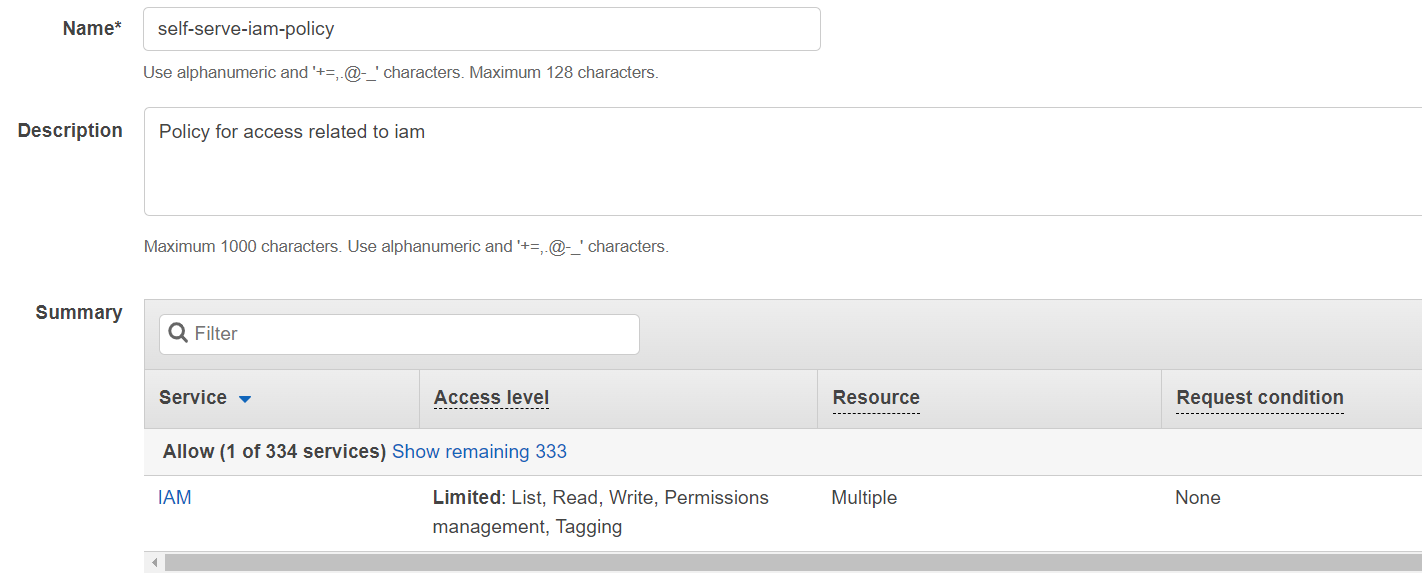
Policy 3: Policy for access related to eks
Section titled “Policy 3: Policy for access related to eks”- Click on IAM from your console and then select Policies.
- Click on Create Policy and then click on JSON to create the policy based on JSON document.
- Paste the following in the text box by replacing its original content.
{"Version": "2012-10-17","Statement": [{"Sid": "SelfServeEksClusterScoped","Effect": "Allow","Action": ["eks:CreateAddon","eks:DeleteAddon","eks:DescribeAddon","eks:ListAddons","eks:UpdateAddon","eks:CreateNodegroup","eks:DeleteNodegroup","eks:DescribeNodegroup","eks:ListNodegroups","eks:UpdateNodegroupConfig","eks:UpdateNodegroupVersion","eks:DeleteCluster","eks:DescribeCluster","eks:UpdateClusterConfig","eks:UpdateClusterVersion","eks:ListUpdates","eks:DescribeUpdate","eks:TagResource","eks:CreateAccessEntry","eks:DescribeAccessEntry","eks:DeleteAccessEntry","eks:ListAccessEntries","eks:AssociateAccessPolicy","eks:DisassociateAccessPolicy","eks:ListAssociatedAccessPolicies","eks:DescribeAccessPolicy","acm:AddTagsToCertificate","acm:DeleteCertificate","acm:DescribeCertificate","acm:ImportCertificate","acm:ListTagsForCertificate","elasticloadbalancing:AddListenerCertificates","elasticloadbalancing:RemoveListenerCertificates"],"Resource": ["arn:aws:eks:<REGION>:<ACCOUNT_ID>:cluster/<ORG_NAME>_<ENV_NAME>","arn:aws:eks:<REGION>:<ACCOUNT_ID>:nodegroup/<ORG_NAME>_<ENV_NAME>/managed-node/*","arn:aws:eks:<REGION>:<ACCOUNT_ID>:addon/<ORG_NAME>_<ENV_NAME>/*/*","arn:aws:eks:<REGION>:<ACCOUNT_ID>:access-entry/<ORG_NAME>_<ENV_NAME>/*","arn:aws:acm:<REGION>:<ACCOUNT_ID>:certificate/*","arn:aws:elasticloadbalancing:<REGION>:<ACCOUNT_ID>:listener/net/*/*/*","arn:aws:elasticloadbalancing:<REGION>:<ACCOUNT_ID>:listener/app/*/*/*"]},{"Sid": "SelfServeEc2Network","Effect": "Allow","Action": ["ec2:AllocateAddress","ec2:AssociateRouteTable","ec2:AttachInternetGateway","ec2:AuthorizeSecurityGroupEgress","ec2:AuthorizeSecurityGroupIngress","ec2:CreateInternetGateway","ec2:CreateNatGateway","ec2:CreateRoute","ec2:CreateRouteTable","ec2:CreateSecurityGroup","ec2:CreateSubnet","ec2:CreateTags","ec2:CreateVpc","ec2:CreateVpcEndpoint","ec2:DeleteInternetGateway","ec2:DeleteKeyPair","ec2:DeleteNatGateway","ec2:DeleteRoute","ec2:DeleteRouteTable","ec2:DeleteSecurityGroup","ec2:DeleteSubnet","ec2:DeleteVpc","ec2:DeleteVpcEndpoints","ec2:DescribeVpcAttribute","ec2:DetachInternetGateway","ec2:DisassociateRouteTable","ec2:ImportKeyPair","ec2:ModifySubnetAttribute","ec2:ModifyVpcAttribute","ec2:ModifyVpcEndpoint","ec2:ReleaseAddress","ec2:RevokeSecurityGroupEgress","ec2:RevokeSecurityGroupIngress"],"Resource": ["arn:aws:ec2:<REGION>:<ACCOUNT_ID>:vpc/*","arn:aws:ec2:<REGION>:<ACCOUNT_ID>:vpc-endpoint/*","arn:aws:ec2:<REGION>:<ACCOUNT_ID>:subnet/*","arn:aws:ec2:<REGION>:<ACCOUNT_ID>:security-group/*","arn:aws:ec2:<REGION>:<ACCOUNT_ID>:security-group-rule/*","arn:aws:ec2:<REGION>:<ACCOUNT_ID>:route-table/*","arn:aws:ec2:<REGION>:<ACCOUNT_ID>:natgateway/*","arn:aws:ec2:<REGION>:<ACCOUNT_ID>:key-pair/<ORG_NAME>_<ENV_NAME>","arn:aws:ec2:<REGION>:<ACCOUNT_ID>:internet-gateway/*","arn:aws:ec2:<REGION>:<ACCOUNT_ID>:elastic-ip/*"]},{"Sid": "SelfServeEksDescribe","Effect": "Allow","Action": ["acm:ListCertificates","acm:RequestCertificate","ec2:DescribeAccountAttributes","ec2:DescribeAddresses","ec2:DescribeAvailabilityZones","ec2:DescribeInternetGateways","ec2:DescribeKeyPairs","ec2:DescribeNatGateways","ec2:DescribeNetworkAcls","ec2:DescribeNetworkInterfaces","ec2:DescribePrefixLists","ec2:DescribeRouteTables","ec2:DescribeSecurityGroupRules","ec2:DescribeSecurityGroups","ec2:DescribeSubnets","ec2:DescribeVpcClassicLink","ec2:DescribeVpcClassicLinkDnsSupport","ec2:DescribeVpcEndpoints","ec2:DescribeVpcs","eks:CreateCluster","eks:DescribeAddonVersions","ec2:DescribeImages","ec2:DescribeInstanceTypes","ec2:DescribeLaunchTemplates","ec2:DescribeLaunchTemplateVersions","ec2:DescribeTags","elasticloadbalancing:DescribeListenerCertificates","elasticloadbalancing:DescribeListeners","elasticloadbalancing:DescribeLoadBalancerAttributes","elasticloadbalancing:DescribeLoadBalancers","elasticloadbalancing:DescribeTags"],"Resource": "*"}]}
- Replace
<ORG_NAME>with the Organization Name,<ENV_NAME>with the Environment name,<REGION>with the Region and<ACCOUNT_ID>with the Account ID in the above JSON policy document. - Click on Next: Tags and Next: Review. You can add tags if you want.
- Name the policy as
self-serve-eks-policyand use the following image to fill in the details and then click Create Policy.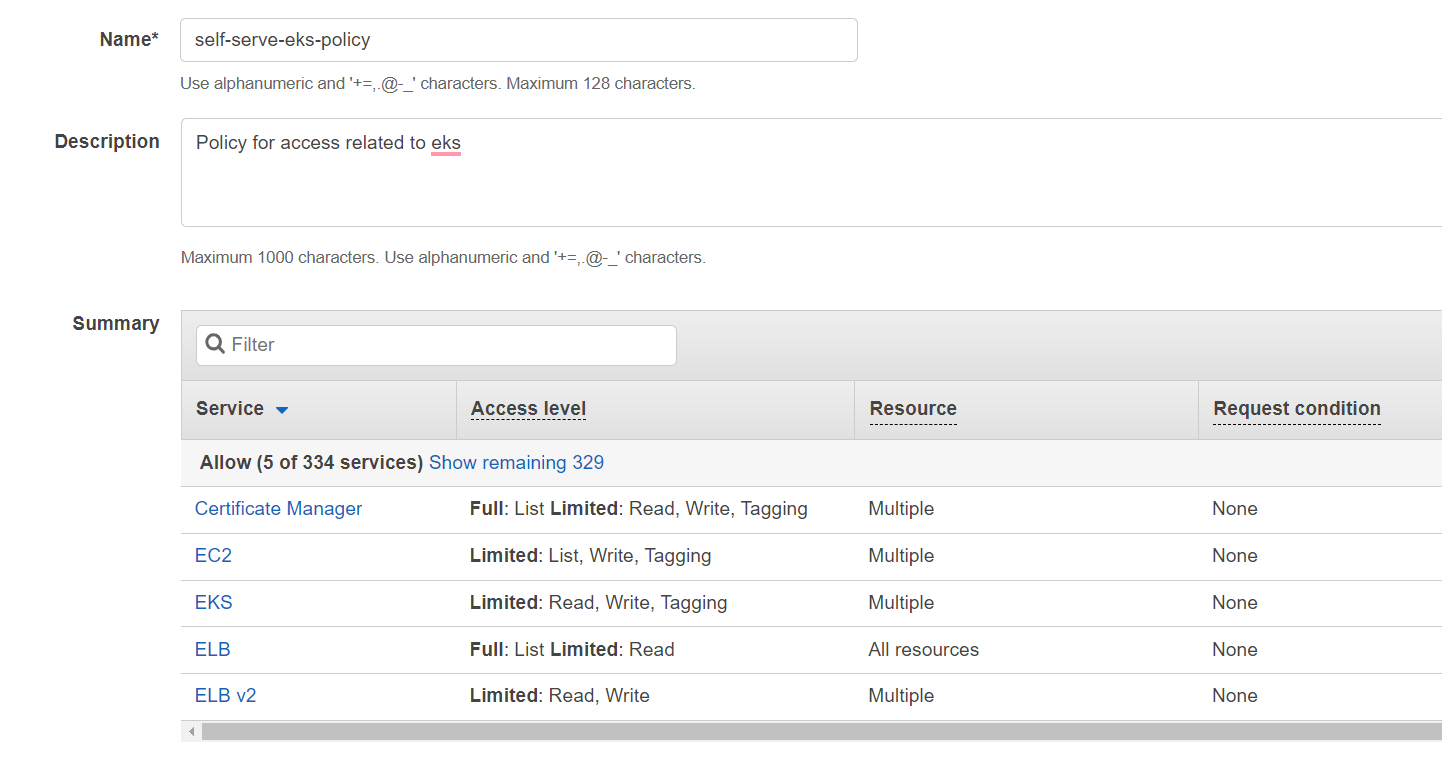
Policy 4: Policy for access related to DB
Section titled “Policy 4: Policy for access related to DB”- Click on IAM from your console and then select Policies.
- Click on Create Policy and then click on JSON to create the policy based on JSON document.
- Paste the following in the text box by replacing its original content.
{"Version": "2012-10-17","Statement": [{"Sid": "SelfServeRdsElastiCache","Effect": "Allow","Action": ["rds:AddTagsToResource","rds:CopyDBParameterGroup","rds:CreateDBInstance","rds:CreateDBParameterGroup","rds:CreateDBSubnetGroup","rds:DeleteDBInstance","rds:DeleteDBParameterGroup","rds:DeleteDBSubnetGroup","rds:DescribeDBInstances","rds:DescribeDBParameterGroups","rds:DescribeDBParameters","rds:DescribeDBSubnetGroups","rds:DescribeOrderableDBInstanceOptions","rds:ListTagsForResource","rds:ModifyDBInstance","rds:ModifyDBParameterGroup","elasticache:AddTagsToResource","elasticache:CreateCacheSubnetGroup","elasticache:CreateReplicationGroup","elasticache:DeleteCacheSubnetGroup","elasticache:DeleteReplicationGroup","elasticache:DescribeCacheClusters","elasticache:DescribeCacheSubnetGroups","elasticache:DescribeReplicationGroups","elasticache:ListTagsForResource","elasticache:ModifyReplicationGroup"],"Resource": ["arn:aws:rds:<REGION>:<ACCOUNT_ID>:db:*","arn:aws:rds:<REGION>:<ACCOUNT_ID>:secgrp:*","arn:aws:rds:<REGION>:<ACCOUNT_ID>:og:*","arn:aws:rds:<REGION>:<ACCOUNT_ID>:pg:<ORG_NAME>-<ENV_NAME>*","arn:aws:rds:<REGION>:<ACCOUNT_ID>:subgrp:<ORG_NAME>_<ENV_NAME>","arn:aws:rds:<REGION>:<ACCOUNT_ID>:cluster:<ORG_NAME>-<ENV_NAME>","arn:aws:elasticache:<REGION>:<ACCOUNT_ID>:usergroup:*","arn:aws:elasticache:<REGION>:<ACCOUNT_ID>:user:*","arn:aws:elasticache:<REGION>:<ACCOUNT_ID>:subnetgroup:<ORG_NAME>-<ENV_NAME>","arn:aws:elasticache:<REGION>:<ACCOUNT_ID>:snapshot:*","arn:aws:elasticache:<REGION>:<ACCOUNT_ID>:securitygroup:*","arn:aws:elasticache:<REGION>:<ACCOUNT_ID>:reserved-instance:*","arn:aws:elasticache:<REGION>:<ACCOUNT_ID>:replicationgroup:<ORG_NAME>-<ENV_NAME>","arn:aws:elasticache:<REGION>:<ACCOUNT_ID>:parametergroup:*","arn:aws:elasticache:<REGION>:<ACCOUNT_ID>:cluster:*"]},{"Sid": "SelfServeDbDescribe","Effect": "Allow","Action": ["rds:DescribeDBEngineVersions","rds:DescribeOrderableDBInstanceOptions","elasticache:DescribeCacheParameterGroups","elasticache:ListAllowedNodeTypeModifications"],"Resource": "*"}]}
- Replace
<ORG_NAME>with the Organization Name,<ENV_NAME>with the Environment name,<REGION>with the Region and<ACCOUNT_ID>with the Account ID in the above JSON policy document. - Click on Next: Tags and Next: Review. You can add tags if you want.
- Name the policy as
self-serve-db-policyand use the following image to fill in the details and then click Create Policy.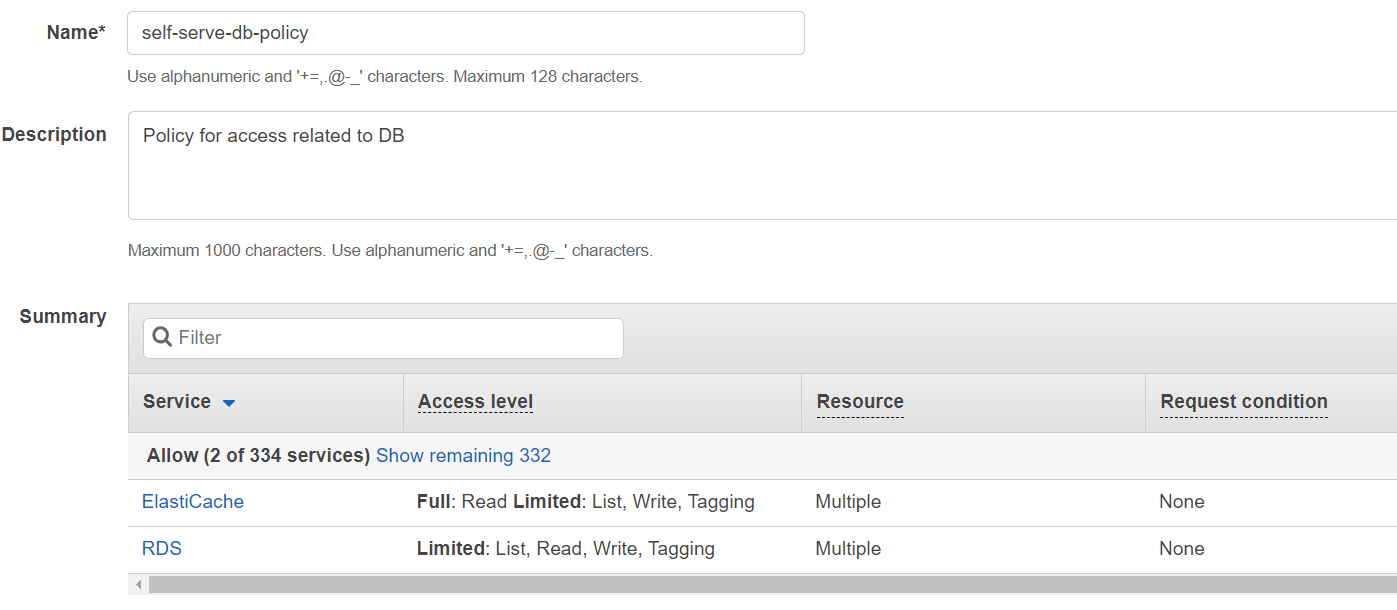
Policy 5: Policy for access related to CDN
Section titled “Policy 5: Policy for access related to CDN”- Click on IAM from your console and then select Policies.
- Click on Create Policy and then click on JSON to create the policy based on JSON document.
- Paste the following in the text box by replacing its original content.
{"Version": "2012-10-17","Statement": [{"Sid": "SelfServeCdnAcmUsEast1","Effect": "Allow","Action": ["acm:AddTagsToCertificate","acm:DeleteCertificate","acm:DescribeCertificate","acm:ImportCertificate","acm:ListTagsForCertificate"],"Resource": "arn:aws:acm:us-east-1:<ACCOUNT_ID>:certificate/*"},{"Sid": "SelfServeCloudFront","Effect": "Allow","Action": ["acm:RequestCertificate","cloudfront:CreateCloudFrontOriginAccessIdentity","cloudfront:CreateDistribution","cloudfront:DeleteCloudFrontOriginAccessIdentity","cloudfront:DeleteDistribution","cloudfront:GetCloudFrontOriginAccessIdentity","cloudfront:GetDistribution","cloudfront:GetDistributionConfig","cloudfront:ListCloudFrontOriginAccessIdentities","cloudfront:ListDistributions","cloudfront:ListTagsForResource","cloudfront:TagResource","cloudfront:UpdateCloudFrontOriginAccessIdentity","cloudfront:UpdateDistribution"],"Resource": "*"}]}
- Replace
<ACCOUNT_ID>with the Account ID in the above JSON policy document. - Click on Next: Tags and Next: Review. You can add tags if you want.
- Name the policy as
self-serve-cdn-policyand use the following image to fill in the details and then click Create Policy.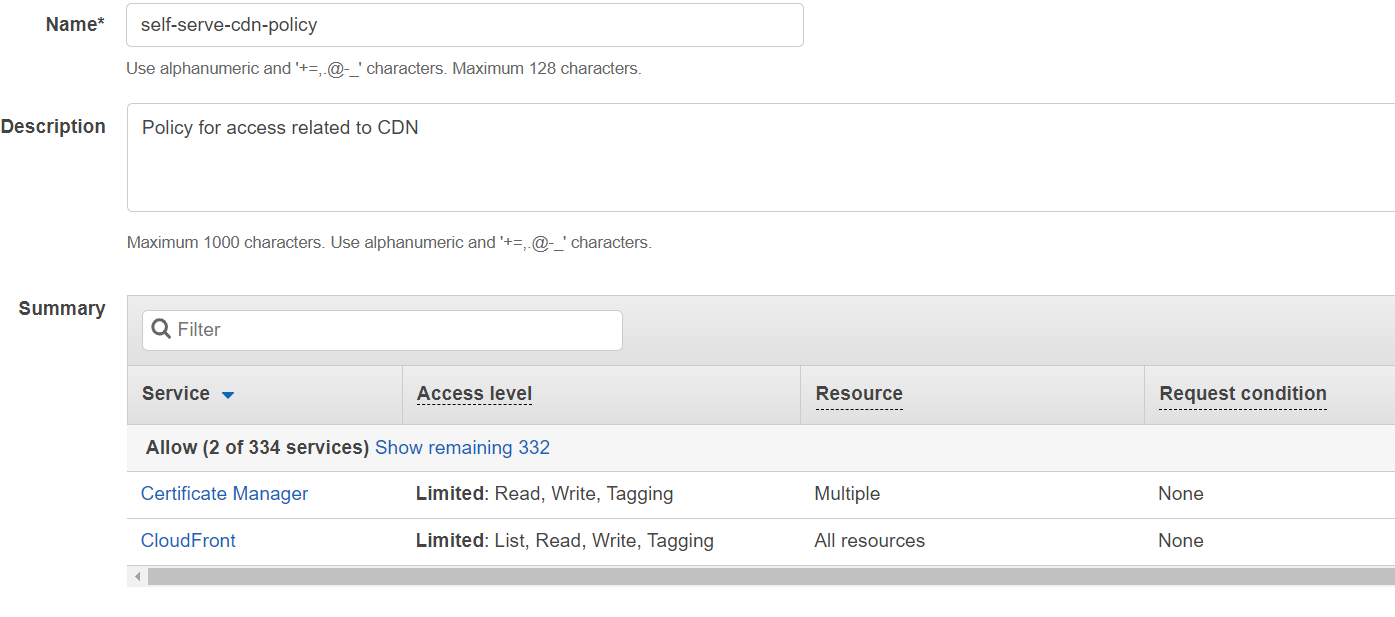
Policy 6: Policy for access related to other extra services
Section titled “Policy 6: Policy for access related to other extra services”- Click on IAM from your console and then select Policies.
- Click on Create Policy and then click on JSON to create the policy based on JSON document.
- Paste the following in the text box by replacing its original content.
{"Version": "2012-10-17","Statement": [{"Sid": "SelfServeExtraScoped","Effect": "Allow","Action": ["secretsmanager:CreateSecret","secretsmanager:DeleteSecret","secretsmanager:DescribeSecret","secretsmanager:GetResourcePolicy","secretsmanager:GetSecretValue","secretsmanager:PutSecretValue","secretsmanager:TagResource","kms:CreateGrant","kms:Decrypt","kms:DescribeKey","kms:GenerateDataKey","glue:BatchCreatePartition","glue:BatchDeletePartition","glue:BatchDeleteTable","glue:BatchGetCrawlers","glue:BatchGetPartition","glue:BatchUpdatePartition","glue:CreateDatabase","glue:CreatePartition","glue:CreateTable","glue:DeleteCrawler","glue:DeleteDatabase","glue:DeletePartition","glue:DeleteTable","glue:GetCrawler","glue:GetDatabase","glue:GetDatabases","glue:GetPartition","glue:GetPartitions","glue:GetTable","glue:GetTables","glue:GetTableVersions","glue:StartCrawler","glue:StopCrawler","glue:TagResource","glue:UpdateCrawler","glue:UpdateDatabase","glue:UpdatePartition","glue:UpdateTable","firehose:CreateDeliveryStream","firehose:DeleteDeliveryStream","firehose:DescribeDeliveryStream","firehose:ListTagsForDeliveryStream","firehose:PutRecord","firehose:PutRecordBatch","firehose:StartDeliveryStreamEncryption","firehose:StopDeliveryStreamEncryption","firehose:TagDeliveryStream","firehose:UpdateDestination","athena:StartQueryExecution","athena:StopQueryExecution","athena:GetQueryExecution","athena:BatchGetQueryExecution","athena:GetQueryResults","athena:GetQueryResultsStream","athena:GetTableMetadata","athena:GetWorkGroup","athena:ListDatabases","athena:ListTableMetadata","athena:CreateWorkGroup","athena:UpdateWorkGroup","athena:TagResource","elasticmapreduce:AddJobFlowSteps","elasticmapreduce:AddTags","elasticmapreduce:DescribeCluster","elasticmapreduce:DescribeStep","logs:CreateLogGroup","logs:CreateLogStream","logs:DeleteLogGroup","logs:DeleteLogStream","logs:DescribeLogGroups","logs:DescribeLogStreams","logs:ListTagsLogGroup","logs:TagLogGroup"],"Resource": ["arn:aws:secretsmanager:<REGION>:<ACCOUNT_ID>:secret:*","arn:aws:kms:<REGION>:<ACCOUNT_ID>:key/*","arn:aws:glue:<REGION>:<ACCOUNT_ID>:catalog","arn:aws:glue:<REGION>:<ACCOUNT_ID>:database/*","arn:aws:glue:<REGION>:<ACCOUNT_ID>:table/*/*","arn:aws:glue:<REGION>:<ACCOUNT_ID>:crawler/*","arn:aws:firehose:<REGION>:<ACCOUNT_ID>:deliverystream/*","arn:aws:athena:<REGION>:<ACCOUNT_ID>:workgroup/*","arn:aws:athena:<REGION>:<ACCOUNT_ID>:datacatalog/*","arn:aws:elasticmapreduce:<REGION>:<ACCOUNT_ID>:cluster/*","arn:aws:logs:<REGION>:<ACCOUNT_ID>:log-group:*","arn:aws:logs:<REGION>:<ACCOUNT_ID>:log-group:*:log-stream:*"]},{"Sid": "SharedTfcSecretRead","Effect": "Allow","Action": ["secretsmanager:GetSecretValue","secretsmanager:DescribeSecret"],"Resource": "arn:aws:secretsmanager:us-east-1:643439964473:secret:blotout/shared-tfc-*"},{"Sid": "SharedTfcKmsDecrypt","Effect": "Allow","Action": ["kms:Decrypt","kms:DescribeKey"],"Resource": "arn:aws:kms:us-east-1:643439964473:key/6765623f-82e4-44e6-9918-1aa2fa57e49a"},{"Sid": "SelfServeExtraAccount","Effect": "Allow","Action": ["sts:GetCallerIdentity","sts:DecodeAuthorizationMessage","ce:GetCostAndUsage","firehose:ListDeliveryStreams","glue:CreateCrawler","glue:GetCrawlerMetrics","glue:GetCrawlers","glue:ListCrawlers","glue:StartCrawlerSchedule","elasticmapreduce:CreateSecurityConfiguration","elasticmapreduce:DescribeSecurityConfiguration","elasticmapreduce:ListClusters","elasticmapreduce:ListSecurityConfigurations","elasticmapreduce:RunJobFlow","dynamodb:CreateTable","dynamodb:DeleteTable","dynamodb:DescribeContinuousBackups","dynamodb:DescribeTable","dynamodb:DescribeTimeToLive","dynamodb:ListTagsOfResource","dynamodb:TagResource","dynamodb:UpdateContinuousBackups","dynamodb:UpdateTable","dynamodb:UpdateTimeToLive","dynamodb:GetItem","dynamodb:PutItem","dynamodb:UpdateItem","dynamodb:DeleteItem","dynamodb:Query","dynamodb:Scan","dynamodb:BatchWriteItem","dynamodb:BatchGetItem","sqs:CreateQueue","sqs:DeleteQueue","sqs:GetQueueAttributes","sqs:GetQueueUrl","sqs:ListQueueTags","sqs:SetQueueAttributes","sqs:TagQueue","sqs:SendMessage","sqs:ReceiveMessage","sqs:DeleteMessage","sqs:ChangeMessageVisibility","sqs:PurgeQueue","sns:CreateTopic","sns:DeleteTopic","sns:GetSubscriptionAttributes","sns:GetTopicAttributes","sns:ListTagsForResource","sns:SetTopicAttributes","sns:Subscribe","sns:TagResource","events:DeleteRule","events:DescribeRule","events:ListTagsForResource","events:ListTargetsByRule","events:PutRule","events:PutTargets","events:RemoveTargets","events:TagResource","cloudwatch:DeleteAlarms","cloudwatch:DescribeAlarms","cloudwatch:GetMetricData","cloudwatch:ListMetrics","cloudwatch:ListTagsForResource","cloudwatch:PutMetricAlarm","bedrock:CreateFoundationModelAgreement","bedrock:GetFoundationModelAvailability","bedrock:GetFoundationModelAgreementOffer","bedrock:ListFoundationModelAgreementOffers","bedrock:InvokeModel","bedrock:InvokeModelWithResponseStream","bedrock:Converse","bedrock:ConverseStream","bedrock:ListFoundationModels","bedrock:PutUseCaseForModelAccess","athena:ListWorkGroups"],"Resource": "*"}]}
- Replace
<REGION>with the Region and<ACCOUNT_ID>with the Account ID in the above JSON policy document. - Click on Next: Tags and Next: Review. You can add tags if you want.
- Name the policy as
self-serve-extra-policyand use the following image to fill in the details and then click Create Policy.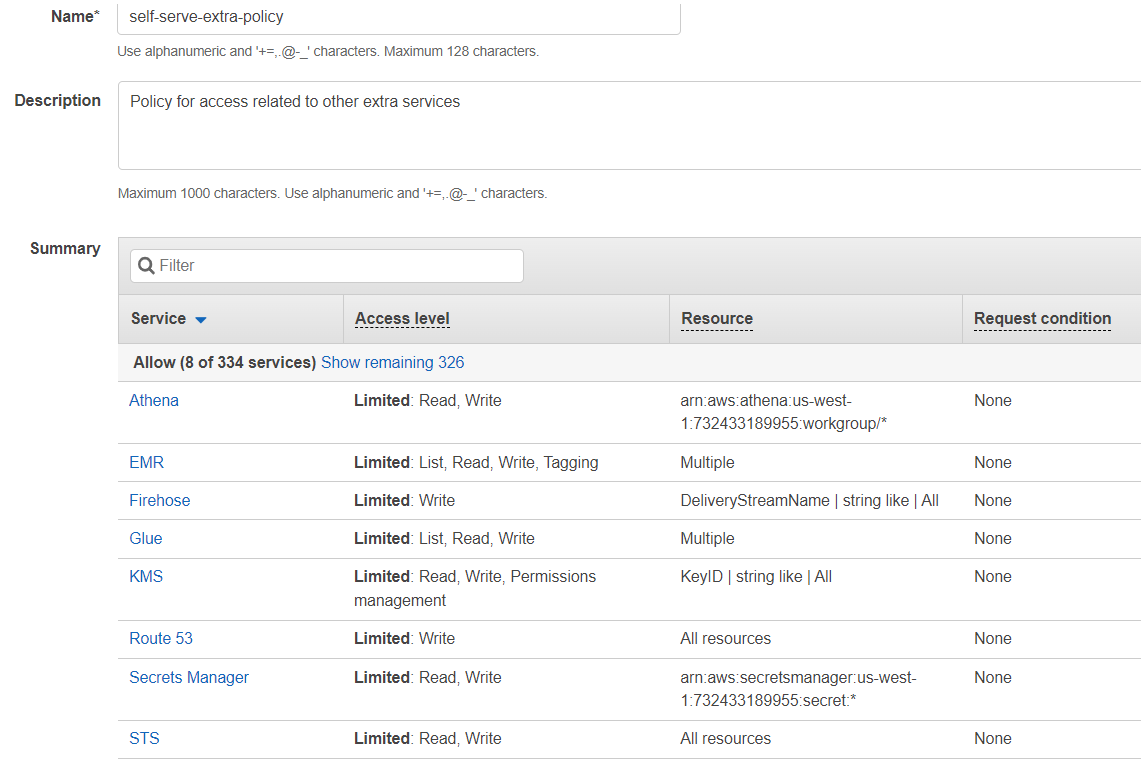
Attaching policies to the IAM user
Section titled “Attaching policies to the IAM user”- Go to console and click on IAM.
- Click on Users and then click on the user you created in the previous step. Taking the previous example name of the user is
blotout. - Click on Add Permissions to attach the permissions to the user
blotout.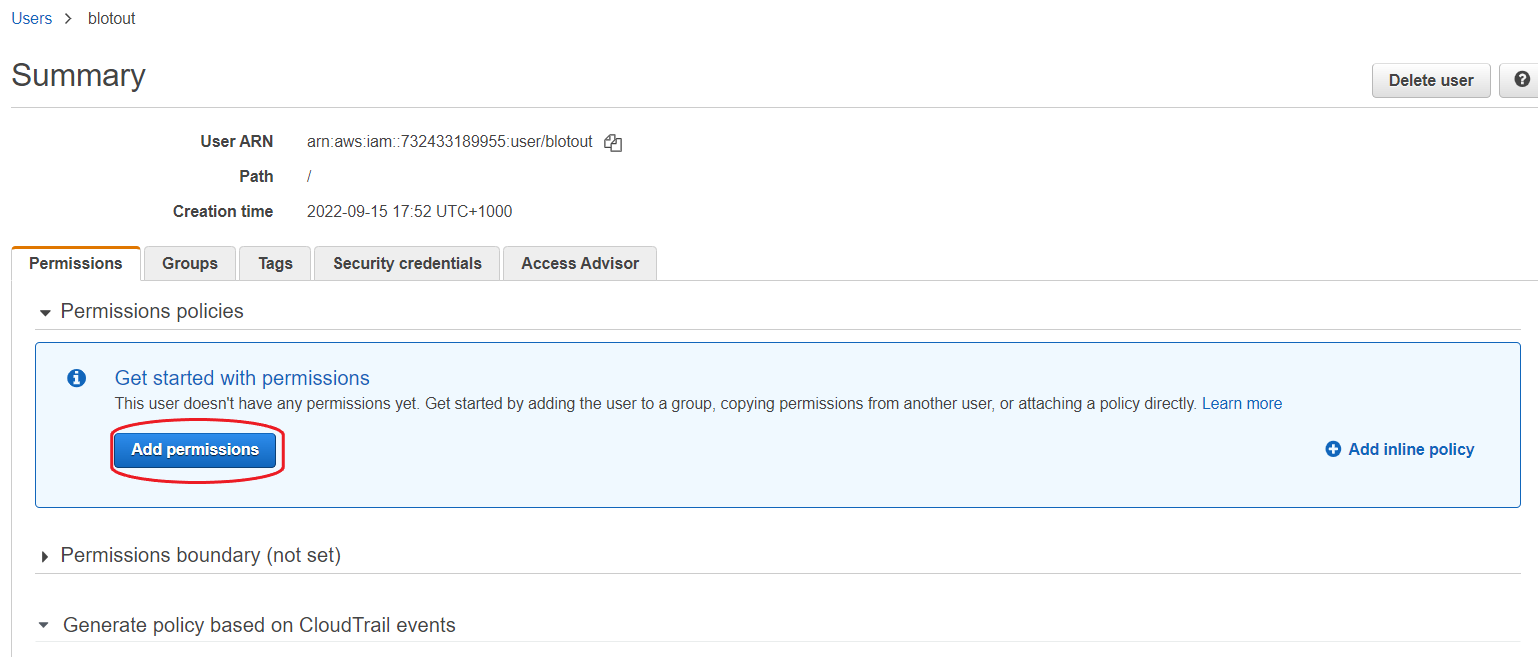
- Click on Attach existing policies directly and then filter the policies by searching self-serve. Select all the policies that we created above.
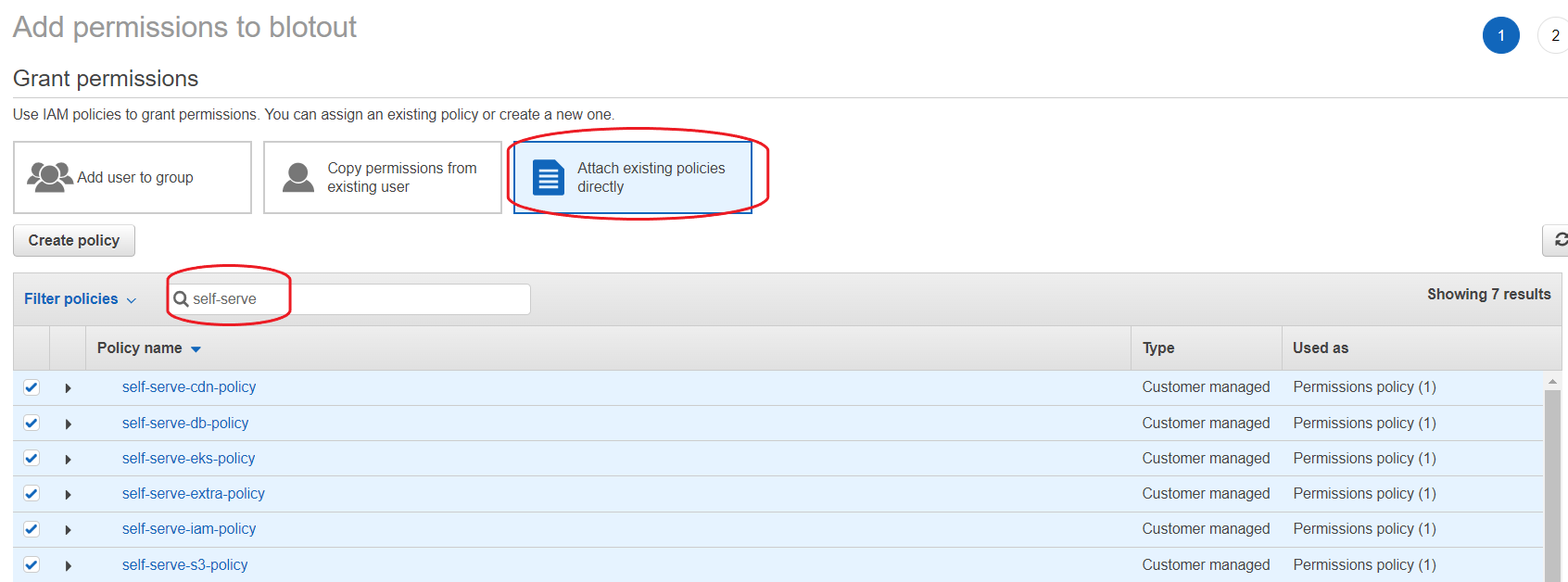
- Click on Next: Review and then Add Permissions.
- Your user (user credentials) now has the required permissions for infra, app, sdk, and cdn Terraform applies.
Common apply failures these policies prevent
Section titled “Common apply failures these policies prevent”| Failure | Missing permission / scope |
|---|---|
Shared TFC GetSecretValue AccessDenied on blotout/shared-tfc | Extra policy statements SharedTfcSecretRead / SharedTfcKmsDecrypt, and client account ID on the secret resource policy |
S3 PutBucketAcl after create | s3:Get/PutBucketOwnershipControls |
| Airbyte v2 log bucket create | b-<ORG>-<ENV>-airbytev2-logs in S3 policy |
| MCP Athena output bucket create | b-<ORG>-<ENV>-athena-mcp-server-logs in S3 policy |
| EKS Access Entry / later Helm unauthorized | eks:CreateAccessEntry, AssociateAccessPolicy, … |
| IRSA / OIDC | iam:CreateOpenIDConnectProvider, UpdateAssumeRolePolicy, ListRoles |
| RDS parameter group | pg:<ORG>-<ENV>* (family suffix) |
| Segment tables/queues | DynamoDB + SQS lifecycle in Extra |
| Activation item/message APIs | DynamoDB GetItem/PutItem/Query + SQS Send/Receive/Delete/Purge in Extra |
| Firehose batch puts | firehose:PutRecordBatch in Extra |
| Athena cancel / batch status | athena:StopQueryExecution, BatchGetQueryExecution, GetQueryResultsStream in Extra |
| Firehose error logging | CloudWatch Logs in Extra |
| Glue crawler alerts | SNS + EventBridge in Extra |
| Bedrock enablement | Bedrock agreement + use-case actions in Extra |
| Ask / Titan 403 on first re-index | Enable amazon.titan-embed-text-v2:0 in Bedrock Model access in the app region (Amazon first-party — no marketplace agreement) |
| Ask Converse / InvokeModel AccessDenied | Scoped IRSA policy on the three model ARNs — attach to {org}-{env}-irsa, not static keys |
| CDN ACM | us-east-1 ACM in CDN policy |
IAM-role auth (IRSA / HIPAA)
Section titled “IAM-role auth (IRSA / HIPAA)”Use this section for HIPAA / role-based deployments that run under IAM-role auth (no static AWS keys). Permission actions live in Policies 1–6 (roles / IRSA only — no IAM user minting). This section covers the IRSA trust policy and the checklist to flip workloads off static keys.
Credential selection is presence-based: static keys are used when present; otherwise the IAM role (via IRSA / the attached instance-pod role, or AWS_IAM_ROLE_ARN assume-role). To move a workload onto the role, unset all of its key env vars (AWS_*, ATHENA_*, AIRBYTE_*).
Replace placeholders before applying: <ACCOUNT_ID>, <REGION>, <OIDC_ID>, <NS>, <SA>, <BLOTOUT_ACCOUNT_ID>, <AWS_IAM_EXTERNAL_ID>, <CLIENT_ROLE_ARN>.
Trust policy (how the role is assumed)
Section titled “Trust policy (how the role is assumed)”IRSA — same-account (preferred)
Section titled “IRSA — same-account (preferred)”One role, referenced by each workload’s Kubernetes service account. Replace <NS> / <SA> with the namespace and service account that mounts the role annotation. Add one sub entry per SA that should assume the role:
{ "Version": "2012-10-17", "Statement": [ { "Effect": "Allow", "Principal": { "Federated": "arn:aws:iam::<ACCOUNT_ID>:oidc-provider/oidc.eks.<REGION>.amazonaws.com/id/<OIDC_ID>" }, "Action": "sts:AssumeRoleWithWebIdentity", "Condition": { "StringEquals": { "oidc.eks.<REGION>.amazonaws.com/id/<OIDC_ID>:aud": "sts.amazonaws.com", "oidc.eks.<REGION>.amazonaws.com/id/<OIDC_ID>:sub": "system:serviceaccount:<NS>:<SA>" } } } ]}For multiple SAs on the same role, use an array of system:serviceaccount:<NS>:<SA> values (one per namespace/SA pair). <NS> and <SA> must match the real Kubernetes objects — a typo fails every AssumeRoleWithWebIdentity with an opaque AccessDenied.
Cross-account (only if the client owns the account)
Section titled “Cross-account (only if the client owns the account)”1. Trust policy on the client’s role (allow our account to assume it, gated by ExternalId):
{ "Version": "2012-10-17", "Statement": [ { "Effect": "Allow", "Principal": { "AWS": "arn:aws:iam::<BLOTOUT_ACCOUNT_ID>:root" }, "Action": "sts:AssumeRole", "Condition": { "StringEquals": { "sts:ExternalId": "<AWS_IAM_EXTERNAL_ID>" } } } ]}2. Identity statement on our IRSA role — add as a sidecar policy on the role (or merge into the role’s permission policy):
{ "Sid": "AssumeClientRole", "Effect": "Allow", "Action": "sts:AssumeRole", "Resource": "<CLIENT_ROLE_ARN>"}Then set AWS_IAM_ROLE_ARN=<CLIENT_ROLE_ARN> and AWS_IAM_EXTERNAL_ID=<AWS_IAM_EXTERNAL_ID> on the workloads.
Ask Bedrock on the IRSA role
Section titled “Ask Bedrock on the IRSA role”Ask (Conversational Analytics) plans with Bedrock, compiles Athena SQL in mcp-service, and narrates the result. This is runtime access on {org}-{env}-irsa (HIPAA / AWS_AUTH_MODE=iam_role / IRSA — do not put this on static keys). Scope to the three model ARNs, not Resource: "*". IAM * does not match :, so keep the :0 suffix on Titan and the dated Claude ids.
Enable all three in the same region as the app (var.aws_region). Marketplace access is per-region; a mismatch 403s at runtime with no build-time signal. Enable Titan now even though phase 1 does not call it — the first docs re-index otherwise fails with a message that looks like a code bug.
| Role | Model id (enable in app region) | Typical invoke id |
|---|---|---|
| Planner | anthropic.claude-sonnet-4-5-20250929-v1:0 | us.anthropic.claude-sonnet-4-5-20250929-v1:0 (or eu. / jp. / au. to match the app region) |
| Narrator | anthropic.claude-haiku-4-5-20251001-v1:0 | us.anthropic.claude-haiku-4-5-20251001-v1:0 |
| Embeddings (phase 2) | amazon.titan-embed-text-v2:0 | same (no inference profile) |
Replace <REGION> and <ACCOUNT_ID>:
{ "Sid": "AskBedrockModels", "Effect": "Allow", "Action": [ "bedrock:InvokeModel", "bedrock:InvokeModelWithResponseStream", "bedrock:Converse", "bedrock:ConverseStream" ], "Resource": [ "arn:aws:bedrock:<REGION>::foundation-model/anthropic.claude-sonnet-4-5-20250929-v1:0", "arn:aws:bedrock:*::foundation-model/anthropic.claude-sonnet-4-5-20250929-v1:0", "arn:aws:bedrock:<REGION>::foundation-model/anthropic.claude-haiku-4-5-20251001-v1:0", "arn:aws:bedrock:*::foundation-model/anthropic.claude-haiku-4-5-20251001-v1:0", "arn:aws:bedrock:<REGION>::foundation-model/amazon.titan-embed-text-v2:0", "arn:aws:bedrock:*::foundation-model/amazon.titan-embed-text-v2:0", "arn:aws:bedrock:<REGION>:<ACCOUNT_ID>:inference-profile/us.anthropic.claude-sonnet-4-5-20250929-v1:0", "arn:aws:bedrock:*:<ACCOUNT_ID>:inference-profile/us.anthropic.claude-sonnet-4-5-20250929-v1:0", "arn:aws:bedrock:<REGION>:<ACCOUNT_ID>:inference-profile/us.anthropic.claude-haiku-4-5-20251001-v1:0", "arn:aws:bedrock:*:<ACCOUNT_ID>:inference-profile/us.anthropic.claude-haiku-4-5-20251001-v1:0" ]}Foundation-model ARNs with bedrock:* are for cross-region inference profiles (CRIS) only — the agreement itself is still created in <REGION>.
Anthropic use-case + marketplace approval is the long-lead item (often 1–5 business days, sometimes longer on a new account). Titan is Amazon first-party: no Terraform agreement resource — turn it on in the Bedrock console Model access page in the app region (usually immediate). Confirm terraform output ask_bedrock_access after apply: enabled_in must equal the app region for all three.
Deployment checklist (flip workloads to role auth)
Section titled “Deployment checklist (flip workloads to role auth)”Unset every key variant on each workload (there is no AWS_AUTH_MODE flag — a lingering key silently keeps that workload on keys):
| Workload | Unset | IRSA service account |
|---|---|---|
| dashboard-backend | AWS_ACCESS_KEY_ID, AWS_SECRET_ACCESS_KEY, ATHENA_ACCESS_KEY_ID, ATHENA_SECRET_ACCES_KEY, AIRBYTE_ACCESS_KEY_ID, AIRBYTE_SECRET_ACCESS_KEY | system:serviceaccount:<NS>:<SA> |
| sdk-backend | AWS_ACCESS_KEY_ID, AWS_SECRET_ACCESS_KEY | system:serviceaccount:<NS>:<SA> |
| mcp-service | AWS_ACCESS_KEY_ID, AWS_SECRET_ACCESS_KEY, ATHENA_ACCESS_KEY_ID, ATHENA_SECRET_ACCES_KEY | system:serviceaccount:<NS>:<SA> |
| Airflow scheduler/worker | AWS_ACCESS_KEY_ID, AWS_SECRET_ACCESS_KEY | system:serviceaccount:<NS>:<SA> |
| dbt + reverse-el pods | drop the awskey ConfigMap; no key env | system:serviceaccount:<NS>:<SA> |
Notes:
- Airbyte writing the client destination bucket uses a separate role (the Airbyte worker’s), not this IRSA role. Grant that worker
s3:PutObject/ListBucketon the destination bucket, or setAIRBYTE_ROLE_ARN. - Python default-chain / Java
DefaultCredentialsProviderread env vars before IRSA — one leftover key env var on a pod silently overrides the role.