Tags
A tag in Blotout Cloud represents an EdgeTag environment — typically mapped to a customer domain or brand. Tags are the top-level scope for organizing applications, data pipelines, segments, and team access within the platform.
What is a tag?
Section titled “What is a tag?”Each tag corresponds to an EdgeTag configuration with its own:
- Domain — the EdgeTag URL (for example,
example.com) - Applications — web or mobile apps registered under the tag
- Data pipelines — Airbyte connectors scoped to the tag
- Segments and audiences — audience rules and activation channels
- Team access — users assigned to work on the tag
When you select a Tag from the dropdown in the top bar, the entire UI — Applications, Data Pipelines, Audiences, and Analytics — filters to that tag’s data.
Tags and applications
Section titled “Tags and applications”Applications belong to a tag. When you create an application, you select the tag and team first. Each application gets a unique App ID, API token, and EdgeTag URL used to connect the SDK and route events.
Tag (example.com) ├── Application: web-store (APP-0001) ├── Application: mobile-app (APP-0002) ├── Data Pipeline: shopify ├── Data Pipeline: facebook_ads └── Segments: High-value buyers, Cart abandonersSetting up a tag
Section titled “Setting up a tag”Tags are created during user onboarding. After signing in:
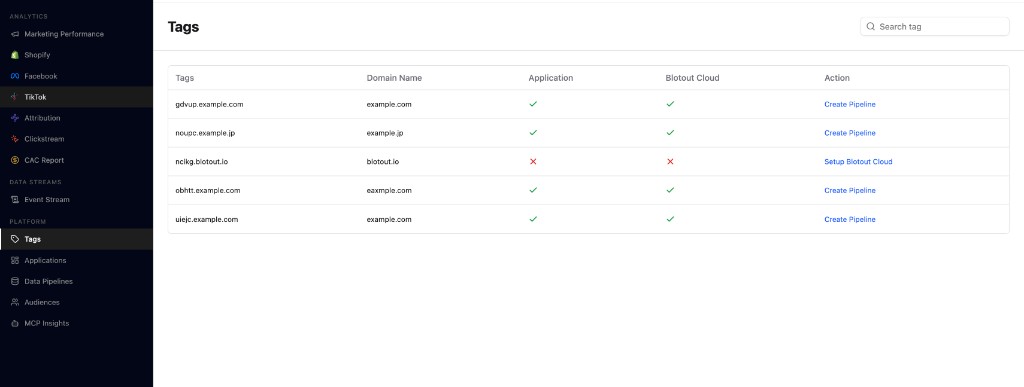
- Open Tags from the left sidebar under Platform.
- Find your tag in the list.
- If Blotout Cloud is not yet configured for the tag, click Setup Blotout Cloud in the Action column.
Tags must be connected on EdgeTag before applications and pipelines can be configured. See Application setup for connecting the EdgeTag provider.
To add a data pipeline for a tag, click Create Pipeline in the Action column on the Tags page. See Data Pipelines for the full setup flow.
Related documentation
Section titled “Related documentation”- User Onboarding — sign in and initial tag setup
- Application — create apps under a tag
- Data Pipelines — connect sources scoped to a tag